
In the ninth week of Imaging, I learned how to edit a picture more efficiently. At first, it was difficult to get accustomed to the tools, because photoshop is way more complex than Illustrator. I struggled with using layer mask to edit pictures and sometimes got confused about how to accurately depict what I wanted to. Although, with practice and several tries, I managed to get a hang of it. I also learned how to use the brightness and contrast to make the characters’ bodies match with the background’s tones and tints, as well as do the same with the saturation. As I got to experiment more with the tools, I taught myself how to show hints of shadows and brightness, too by adjusting the opacity of the brush between 60%-80% in order to create an illusion of shadow. (Around Alice’s feet and near the flowers and vines.)
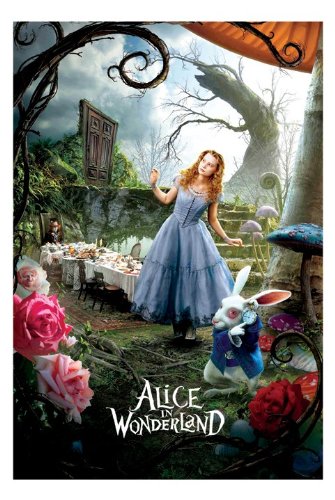
Original Poster of Alice in Wonderland 
Alice in Wonderland poster recreated by me on Photoshop
Another helpful tool was the magic wand tool that really made it easier to work on photoshop with. I hadn’t explored it as much in Illustrator, so when I got introduced to it in photoshop, I found it to be easier to make edits with and select specific parts of a picture with.
 🧿AYUSHI MODI 🧿